Showing posts with label Computer Mice. Show all posts

Monday, July 20, 2026

Of Computer Mice and Woodgrain-The Original ENGELBART Mouse and how ENGELBART revolutionized the Modern Computer

Computer Mice need Woodgrain Accents!!!

SERIOUSLY!

And it's all been set in stone since the day DOUGLAS ENGELBART made the very first COMPUTER MOUSE at MENLO PARK, CALIFORNIA.

No seriously, that's the actual mouse above.

I first saw this mouse as a picture in an old book that the LATCH KEY after school program had and I was mesmerized while at the same time confused about it's presence. 


But how did the MOUSE came to be?


ENGELBART wanted to further develop how a COMPUTER should really work since at this point, even with MINICOMPUTERS, 
They were still way out of reach for the average consumer due to their high price....


But that's not all:

They also need an interface to work with and nobody's gonna have the time or money to maintain or restock ink and paper on a teletype terminal
"I demand INK & Paper... STAT!!!!!"

So, wanting to make the Computer easier to use for both the average consumer and the typical business person, 

DOUG,
"THAT'S ME!"

NO! Not you DOUG FUNNIE!

I meant DOUG ENGELBART!!!!
He got to work on what would eventually be everyday tools for the average user.

His team at SRI INTERNATIONAL developed Computer Interface elements that include BITMAPPED GRAPHICS

Hypertext,
That.....
More like the Hypertexts that make up links to part of my blog or other websites...


Telecommunication
For late 1960s Telecommunication before the says of ZOOM, TEAMS, etc.,
This was way ahead of it's time.


And others.


This would eventually lead to the MODERN GUI Operating environment that we use today.
Microsoft Windows 11

Mac OS Tahoe (Version 26)
(now, we have Mac OS Golden Gate Version 27)

Fedora Linux Version 44


But you need something to interface with a Graphic Environment.

After all, using a keyboard is no good like that.....

And nobody is gonna dedicate their arm muscle strength to use a light pen for extended hours on end.

So....

To relieve the arm strength for the light pen,

Engelbart made the first patents for what would become the mouse

By 1964, BILL ENGLISH would later join ARC to built the prototype shown below:

And thus, the very first COMPUTER MOUSE was born....

He did not have a name for it yet and at first, was considering the name:

X-Y Indicator.

But the name didn't stick well.... or for too long.

then an employee made a comment that the Braided Cable looks very similar to a Mouse's tail


And because the Cord was at the end of the mouse,
just like how a real Mouse's tail is at the tailbone area of the actual rodent
"I resemble that remark!!!!"


So.....

That's why the name MOUSE remained ever since.

I've also read that the CURSOR was called CAT but I refute that.


While ultimately the First Mouse wound up being a prototype used for testing purposes at SRI, it did lead to development of another prototype that's more robust than the original:
And this is the one that was used by ENGELBART and his fellow co-workers during that famous presentation called THE MOTHER OF ALL DEMOS.


If you want to watch the presentation, here's the YOUTUBE link:

The mouse had a slow start getting used in Computers during the 70s as many people still preferred the old school Command Interface since the teletypes and the later Glass Terminals used that interface.

One of the very first computers to use the mouse was the XEROX ALTO in 1973.
And even then, not many people would still be willing to use the mouse yet.

Not even the 1977 TRINITY of COMPUTERS used the mouse when they made their debut

It wasn't until the IBM PC in 1981 that is was made possible to have the mouse ready for general users.

Yes, I know that computers like the APPLE II, the Commodore 64, the Atari 8-Bit Series, Tandy Color Computers, they all gained the ability to later use a mouse

But for the sake of this post, I'm mentioning players like IBM and APPLE...

One of the very first PC MICE to make their debut were a few of them.

The Microsoft Mouse

The Logitech Smaky Mouse
The MOUSE SYSTEMS Optical Mouse, 

Just to name a few.


So no....

It wasn't APPLE who invented the MOUSE for the MACINTOSH or LISA Computers.

The MOUSE has been with us since the early PC Days, since the XEROX days....

and even since ENGELBART's patents.


Of course, they all have one thing in Common:

THEY'RE ALL MADE OF PLASTIC!!!

Whether it's hard, flimsy, or ABS, all Mice use an outer shell that's made of plastic.


And it doesn't matter whether the mouse is Opto-mechanical or Fully Optical,

The build quality of the mouse really matters.

But using a Mouse that's made of actual wood and not vinyl wrapped is something that we often don't see that much anymore.

An attempt was made in 1999 however to make MICE out of wood again..... sort of.


In 1999, the OBERHOFER Boutique Company just took the guts out of a LOGITECH WIRELESS MOUSE and put it in the shell of an actual hand carved Mouse made by a master woodsman who moved from AUSTRIA to the UNITED STATES around that time.

I wish I could show you photos but several GOOGLE(& DUCKDUCKGO) searches came up empty so instead, I'll just embed LGR's video talking about the mouse:

And while I've seen photos of WOODGRAIN MICE,


They're often of the fake wood, vinyl wrapped, or they use Bamboo instead of walnut or evergreen wood....

I'd rather prefer real wood to be use as the MOUSE shell...

Sure, it was a dubious effort for that AUSTRIAN-AMERICAN to just take an existing BOARD DESIGN to make OBERHOFER's mouse,

But at the same time, it was an effort that made the mouse all the more impressive, even if it was wireless.


Saturday, March 28, 2026

What makes a good Gaming Mouse?

Sometime in mid-to-late January 2026,

I stopped by my local BEST BUY in DOWNTOWN VANCOUVER and bought this beauty right here:

The RAZER BASILISK V3 PRO Wireless Gaming Mouse, 

This is my current mouse that I use with my Ryzen 9 9950X3D Custom build.

Alongside my DELL INSPIRON RYZEN 7 LAPTOP.


One of the reasons I switched back to RAZER from my previous LOGITECH is not because I like RAZER's products more but rather I wanted to go back to using a Wireless Mouse as I've started to use my DELL RYZEN 7 Laptop connected to my HISENSE TV as well as my ASUS ULTRAWIDE Monitor but the problem with using my other mice is due to their USB Cables and my Cat MISO has taken a liking to biting said cables.

"IT WASN'T ME!!! I SWEAR!!"

I was considering switching to a CORSAIR variant of my LOGITECH HERO because I like the ICUE LINK software but for some reason, I decided to switch back to RAZER.


Now I don't claim to be a designer but If it were up to me to design a mouse for a Company should they hire me, 

Here's what I want in a MOUSE:


COMFORTABILITY:

Like a lot of you people who use computers, 

I've got big hands.

I've used some small mice in the past and they don't fill my hand very well so I want that comfort of holding a mouse that I can rest my palm on.

And what I want is that convex curvature to allow your palm to rest on. 

I've dealt with some demo units that are just flat slabs with rounded edges but I wouldn't be caught dead using such a form factor.


NAVIGATABILITY:

One thing I liked about my previous RAZER DEATHADDER Mouse I've used with the MSI Laptop, my original MAVERICK WARHAWK RTX 5900x build, and the first few months of the FALCON 7900RT's existence is the two buttons on the side which I actually use for navigating pages whenever I'm on WINDOWS EXPLORER or BROWSING the web via GOOGLE CHROME.

Not many Mice come with those side buttons and I definitely like that. 


It's so much better than moving your Mouse to the arrow buttons and it certainly beats having to use ALT-(Arrow Keys) when I'm navigating.


One style of mouse I just can't seem to grasp however are those that use a KEYPAD on the side

I've tried some Demo Units at my BEST BUYs before like this CORSAIR MOUSE on a Demo Kiosk at the CAMBIE St. BEST BUY. 
and while the movement of the mouse is decent and I like the Ergonomics,
some games I can barely play due to how small and close in proximity these keys are on the mouse.

And they make File/Web Exploration more difficult for me without those navigation buttons.

This ain't the days of the ATARI JAQUAR version of DOOM from ID Software.

3 months since making this post, I've read a news report about an AMERICAN DOCTOR who goes by the name of DOCTOR JAMES RIES who actually swears by the use of a RAZER NAGA V2 PRO mouse where he uses the number pad on the side of the mouse for inputting codes on his work sheets..... 

You know what, 
here's the TOM'S HARDWARE ARTICLE about RIES' use of his Mouse

And here's the embedded WEBINAR on VIMEO:

THIS DOCTOR TREATS PATIENTS WITH A RAZER GAMING MOUSE


LOCKABLE SCROLL WHEEL:

One thing I liked in my LOGITECH HERO MOUSE was the ability to unlock the scroll wheel so I can freely scroll through pages without hearing that tactile click on my mouse and if I want to switch back to that, I can just lock the wheel back.

Not many Mice have that ability, not even the Corsair Mice I was browsing have that.

I was glad I went with my RAZER BASILISK due to it's ability to Lock the scroll wheel though it's system of doing that requires it to be powered on either via USB or through it's battery.


ADDED WEIGHT:

What's with this trend of making MICE lightweight? I just can't understand that. I started to notice this when I used my DEATHADDER ELITE mouse and I noticed how lightweight it felt to hold when compared to another LOGITECH I've used which granted it was because of the swappable AA Battery I used in that thing.

Anyway, I'm not a fan of Gaming Mice that are advertised as ULTRA-LIGHTWEIGHT because to me, it feels weird that way because How am I susposed to take it's HIGH PRICES seriously if they weigh about as much as a CHEAPO Mouse?

I sometimes demo these MICE in stores like BEST BUY and MEMORY EXPRESS and they about weigh nothing......and they almost feel like they're made of cheap plastic even though they're susposed to be sturdy.


And god forbid the cheapo Regular Mice that pretty much weigh like nothing.

There is a set of Keyboard and Mouse that one of the translators for my Church use and that particular mouse is SO LIGHTWEIGHT, that I suspect the whole mouse is made of the same material as a DVD Case.


SWITCHABLE CONNECTIVITY:

One reason I chose my RAZER BASILISK is due to it's 3-IN-1 feature where it can be used either connected to the computer, wireless via the dongle, or wireless via Bluetooth.

I can choose to use the mouse in any mode thanks to it's little switch on the bottom where it's labelled 2.4GZ, BLUETOOTH, or WIRED.

For my MAVERICK FALCON 7900RT, I just use it's Dongle.

For others like my DELL LAPTOP, I use Bluetooth.


ADJUSTABLE DPI:

Regular/Office Mice have no way for you to change the DPI unless you go to system settings on your Windows, Mac, or Linux machine but even then, I find that mentally cumbersome. 

One thing I like about gaming Mice is the ability to change the DPI on the fly.

There are Two Styles of DPI Buttons

The first is DPI UP/DOWN Buttons where the mouse will let you set your DPI either upward or downward to suit your needs on your desk.

The Second is the DPI CYCLE Button where it's just one button but you can cycle through your different DPI settings.


My DEATHADDER ELITE Mouse is one of those that use the DPI UP/DOWN Buttons,

while my BASILISK has one of these CYCLE Buttons built into it.


Though my LOGITECH does have both built in

G7 & G8 are the UP/DOWN Buttons while G9 is the Cycle Button

I don't know what my Current DPI for my BASILISK is set to.....

Last I checked on the RAZER SYNAPSE app, My Basilisk is set to 1600 DPI.


Clearly, the late DOUGLAS ENGELBART didn't realize that his invention of the MOUSE would be used in VIDEO GAMES


which required manufacturers to reconfigure the philosophy of how a Mouse should be built. 

But we should all thank ENGERLBART and his friend BILL ENGLISH for the most important tool that we use in computers today.

Saturday, August 03, 2024

25th Anniversary: Razer and their Mice

Even though they actually started in 1998, Razer has been churning out PC Products Left and right since 1999.


One of their very first products is this mouse:


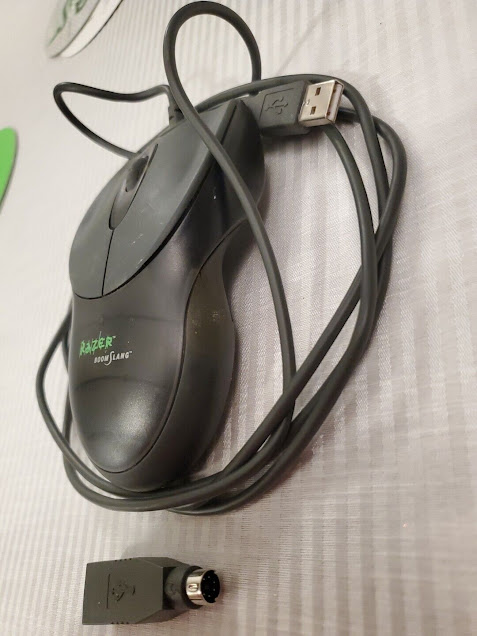
The Razer Boomslang.

This was the mouse that put Razer on the forefront of PC Gaming when it launched in 1999.

It was launched when Gamers wanted to have a mouse to help them play their favorite FPS Games such as Quake III Arena, Half-Life, Unreal Tournament, etc.

It came in a near-overkill packaging that looks like an aluminum container meant to hold your Danish Desserts.


The mouse as seen from above is tucked in snuggly in a foam insert.


And here's a human hand holding the mouse in all of it's glory.

(It's actually Linus Sebastian's hand by the way)


This was before gaming mice had multiple Buttons. 
Back then, 3 buttons were the maximum you can ask for....

Though I checked and the mouse actually had side buttons but not like today's where the side buttons, whether it's navigation or number pads, are on the left side, the side buttons are perpendicular from one another to maintain some form of ambidextrousness compared to today's gaming mice which gives the finger to the left hand oriented gamer. 


And what operating system were people using back then?

Though that was the majority of users back then.

Some still ran 95, some ran NT 4.0, some ran a flavor of Linux, and some just had MACs back in the day.


One thing that is indictive of this mouse is that it's a USB Mouse.

Yes. That USB.

Back in 1999, USB 1.1 was the standard.


And you thought people didn't use USB until the Windows XP era. Did you?

Truth of the matter is that USB during the Windows XP era was mostly 2.0.....


And to a lesser extent: 3.0..... though by that point, people were using Windows 7 when the USB 3.0 standard was introduced.


Truth of the matter though is that USB has been with us since 1996,

starting with Intel's Socket 7 board specification.


Though the first boards didn't include it out of the box, it did have support for breakout cables that plugged into a motherboard header and attached to the Expansion brackets on the back of the PC.

Though USB could only be enabled at first via BIOS updates and settings as well as drivers required to get it running on Windows 95 and later.


Later motherboards released during the Slot 1, Super Socket 7, and iMac G3 era, put USB in as an out-of-the-box requirement.


But if USB wasn't your cup of tea back then, especially with older standards and/or reducing input lag,

Razer got you covered with the inclusion of the USB-to-PS/2 dongle included.

Oh how nice of them to give you that back then.


One other thing to show off that this was released in 1999 is if you look underneath the mouse

Yes. Even in 1999, Razer still made the mouse an OPTO-MECHANICAL deal.

What's an opto-mechanical mouse?

Well it's a mouse that uses a ball to track your movement.

The ball rubs on rollers which are actually stems that connect to encoding disks.

The disks have holes in them and that's for the little LEDs to shine through.


So it's still optical but it's well hidden from normal view.

Oh and by the way, the balls may be rubber but that's because it's actually a steel ball that's been coated around with a rubber.


Anyway, the Boomslang gave way for future Razer mice in the coming years.

All with Snake and Spider themes for names.


One of them is a mouse I actually use called the DEATHADDER ELITE.

I actually got this mouse from a Value Village Thrift Shop back in 2023 because I've been running into some reliability issues with my Wireless Logitech Mouse's Kailh Switches for the mouse buttons.


And believe it or not, My Razer Deathadder Elite Mouse is still working after I purchased it at VALUE VILLAGE.


This is the premiere edition of my Anniversaries series of Posts for certain things.


I've got more anniversaries to look forward to.


Update as of December 1 2024:

I've since switched to a Logitech G502 Hero Gaming Mouse for my line of work.

I still have the Razer Mouse but it's currently in storage.


Another update as of January 22 2026:

Well.... I'm back to RAZER MICE once again.

I spent about $257 on a new RAZER BASILISK V3 Wireless Mouse.